
Dynamic Malware Analysis Misconceptions: 6 Errors That Skew Your Results
Dynamic analysis reveals runtime behavior but often misses static threats, allowing malware to hide behind environmental checks and anti-VM tricks.
Dynamic malware analysis runs code in a safe environment to observe behavior. It fails when malware detects the sandbox and sleeps, or when it relies on fileless techniques. You must combine it with static review and network monitoring to see the full threat picture. Relying solely on execution logs leaves blind spots.
Misreading: The Sandbox Sees Everything
Correct reading: Dynamic analysis captures only what the malware chooses to do in that specific environment. Sandboxes are isolated systems that record system calls, network traffic, and file changes. Malware authors design their code to detect these isolated environments. If the malware identifies a sandbox, it often exits immediately or performs only benign actions. This behavior means the analysis log shows nothing malicious. You might conclude the file is safe when it is actually dormant. The silence in the logs is not safety; it is evasion.
Imagine a piece of software that checks for the presence of debugging tools. If it finds them, it pretends to be a harmless calculator. In a production environment, no debugger exists. The software then steals credentials. Your dynamic analysis tool, which acts like a debugger, sees only the calculator. This is a common failure mode for automated analysis platforms.
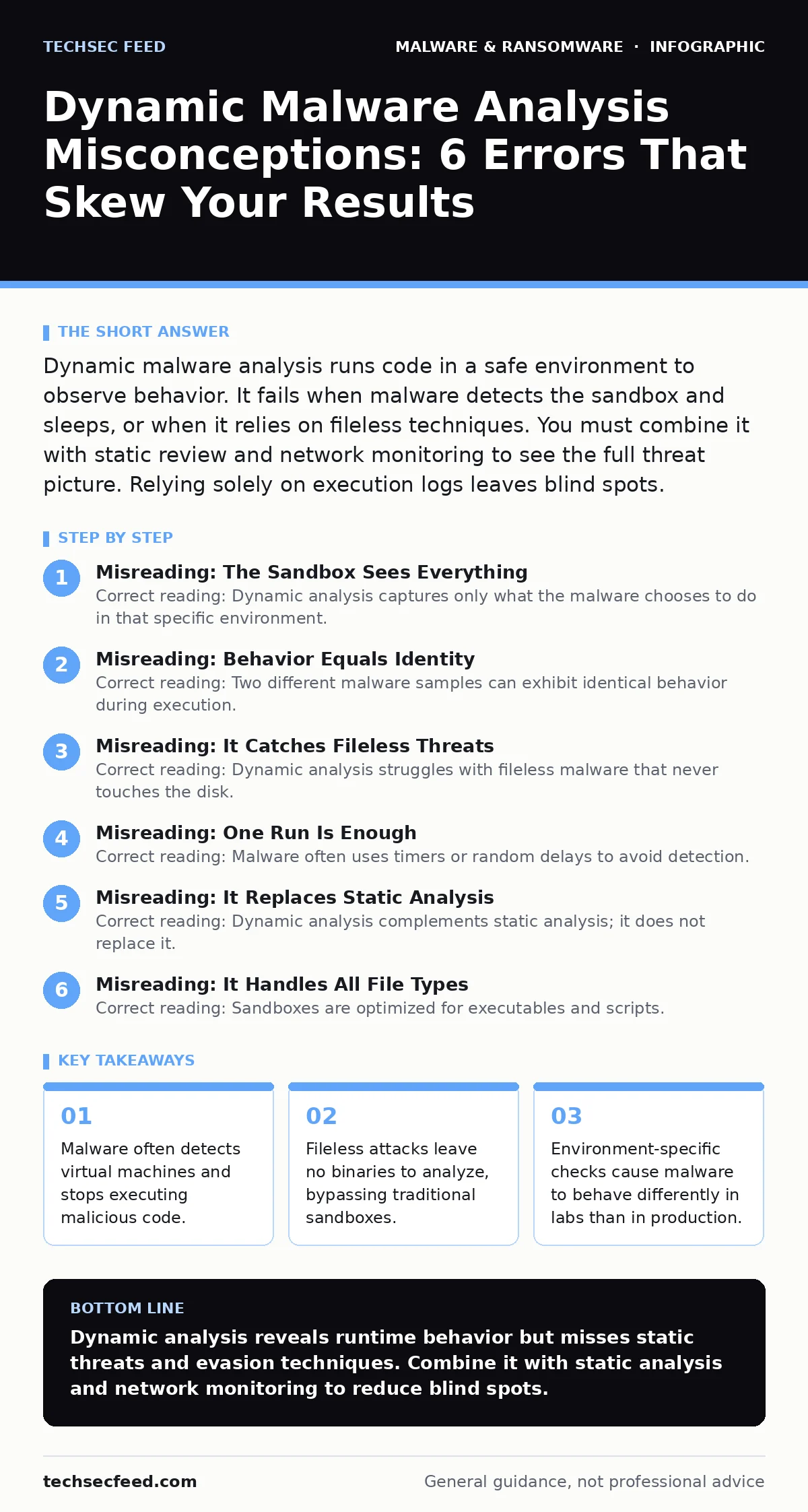
Misreading: Behavior Equals Identity
Correct reading: Two different malware samples can exhibit identical behavior during execution. Dynamic analysis records actions, not intent or code structure. A legitimate system utility and a malicious trojan might both write to the same registry keys or open the same network ports. Without static analysis, you cannot distinguish between the two based solely on runtime logs. You might flag a critical system process as malicious because it behaves like a known threat. This leads to false positives and operational disruption.
Consider a script that downloads updates from a vendor server. A downloader malware also downloads payloads from a command-and-control server. Both actions look like network requests to external IPs. The dynamic analyzer sees outbound traffic in both cases. It cannot tell the difference without inspecting the content or the destination reputation. You need context beyond the raw execution trace to make accurate judgments.
Misreading: It Catches Fileless Threats
Correct reading: Dynamic analysis struggles with fileless malware that never touches the disk. Fileless malware runs entirely in memory, using legitimate tools like PowerShell or Python. Traditional sandboxes monitor file creation and modification. If no file is written, the sandbox may not trigger any alerts. The malware executes, steals data, and disappears without leaving a binary artifact for the analyzer to process. You might assume that because no file was dropped, no threat occurred.
Suppose an attacker injects code into a running process. The process continues to function normally, but now it sends data to an external server. The dynamic analyzer sees the process running but may not capture the injected code if it does not hook the memory correctly. This technique bypasses many standard detection mechanisms. You must monitor process injection and memory activity, not just file drops.
Misreading: One Run Is Enough
Correct reading: Malware often uses timers or random delays to avoid detection. A single execution in a sandbox may not trigger the malicious payload if the sandbox times out before the delay expires. Malware authors add sleep functions or random waits to outlast the observation window. If the sandbox shuts down the process after 10 minutes, and the malware waits 15 minutes, you see nothing. You must run the sample multiple times with varied configurations to catch delayed behaviors.
Imagine a worm that only activates on Mondays or after a specific number of reboots. A standard analysis run on a Tuesday will show no worm behavior. The sample appears inert. You must vary the system clock and reboot count to force the malware to activate. This increases the resource cost of analysis but improves detection rates for time-based threats.
Misreading: It Replaces Static Analysis
Correct reading: Dynamic analysis complements static analysis; it does not replace it. Static analysis examines the code without running it, looking for strings, imports, and structures. Dynamic analysis observes runtime behavior. A sample might be packed or encrypted, hiding its static features. Running it unpacks the code, revealing the true payload. However, static analysis can identify obfuscation techniques that dynamic analysis misses. Using only one method leaves gaps in your understanding.
Consider a document with a macro. Static analysis can read the macro code and identify suspicious commands. Dynamic analysis opens the document and watches what happens. If the macro is disabled by the sandbox settings, the dynamic analysis fails. You need both methods to confirm the threat. Static analysis tells you what the code can do. Dynamic analysis tells you what it did do in your environment.
See also: Command and Control Traffic: Stages, Mechanics, and Interruption Points · Canary Tokens Checklist for Detecting Early Intrusion Attempts
Misreading: It Handles All File Types
Correct reading: Sandboxes are optimized for executables and scripts. They often fail to analyze complex documents, archives, or compiled libraries correctly. A malicious PDF might require a specific viewer version to trigger the exploit. If the sandbox uses an outdated viewer, the exploit fails, and the malware remains hidden. You might assume the PDF is safe because it did not execute code in the sandbox. The vulnerability exists in the interaction between the file and the application.
Suppose a malicious archive contains a script that only runs if a specific environment variable is set. The sandbox does not have this variable. The script fails to execute. You see no malicious activity. You must configure the sandbox to mimic the target environment as closely as possible. This includes installing the same software versions and setting the same environment variables.
Misreading: It Detects Polymorphic Variants
Correct reading: Polymorphic malware changes its code structure with every infection, but its behavior remains similar. Dynamic analysis can detect the behavior, but it may miss the connection between variants. If each variant uses a different command-and-control server, the dynamic analyzer sees unrelated network traffic. You might treat each variant as a new threat, missing the broader campaign. Static analysis can identify the common engine or signature family that links the variants.
Imagine a virus that encrypts its payload differently each time. The encryption key changes, but the decryption routine is the same. Dynamic analysis sees the decryption and execution. It does not see the encryption key generation. You need static analysis to identify the constant elements of the code. This helps you build broader detection rules that catch all variants, not just the one you analyzed.
Misreading: It Is Safe for Production Use
Correct reading: Running dynamic analysis on production systems is dangerous. Sandboxes are isolated by design. Production systems are connected to networks and user data. If you run a malware sample on a production machine to "see what it does," you risk infection. The malware might escape the analysis environment and spread across your network. You must use dedicated, isolated analysis environments. Never analyze suspicious files on endpoints that hold sensitive data.
Suppose an analyst decides to run a suspicious executable on a corporate laptop to test a theory. The malware steals credentials and installs a backdoor. The analyst has compromised the entire network. This mistake is common among teams that lack proper isolation tools. Always use virtual machines or containers that are disconnected from the corporate network.
Misreading: It Identifies the Attacker
Correct reading: Dynamic analysis shows what the malware does, not who wrote it. You might see network connections to a specific IP address. This IP might be a proxy, a compromised server, or a decoy. It does not identify the criminal group or the individual attacker. Attribution requires intelligence beyond runtime behavior. You might mistakenly blame a specific actor based on network traffic patterns. This leads to incorrect defensive strategies.
Imagine a botnet that uses multiple layers of proxy servers. The dynamic analyzer sees the traffic going to the top-level proxy. You block that IP. The attacker switches to a new proxy. Your defense fails. You need threat intelligence to understand the infrastructure behind the traffic. Dynamic analysis provides data points, not attribution.
Misreading: It Works on Mobile Malware
Correct reading: Mobile malware behaves differently than desktop malware. Sandboxes for Android or iOS must mimic the mobile operating system and user interactions. A mobile sandbox might not simulate touch inputs or location services correctly. The malware might require a specific user action, like granting permission, to activate. If the sandbox does not grant this permission, the malware remains dormant. You might conclude the app is safe when it is actually malicious.
Suppose an Android app requests SMS permissions. The sandbox denies this permission by default. The app cannot send spam texts. The dynamic analysis shows no malicious activity. In the real world, a user grants the permission. The app sends spam. You must configure the sandbox to grant and deny permissions in various combinations to test all behaviors.
Misreading: It Catches Malvertising
Correct reading: Malvertising involves malicious advertisements that redirect users to exploit kits. Dynamic analysis of the ad file itself might show nothing. The malice is in the redirection logic and the server-side exploit. You must analyze the entire chain, from the ad to the landing page. Analyzing only the initial ad file misses the threat. You need to capture network traffic and follow redirects to see the full attack.
Imagine a banner ad that contains a JavaScript snippet. The snippet is harmless on its own. It redirects to a server that hosts an exploit. The dynamic analyzer sees the redirect but might not execute the exploit if it blocks external requests. You must allow controlled external requests to see the exploit attempt. This requires careful configuration to avoid infecting the analysis environment.
Misreading: It Handles Scareware
Correct reading: Scareware relies on psychological manipulation, not technical exploits. It displays fake warnings to trick users into paying or installing software. Dynamic analysis might see the display of these warnings but classify them as benign UI changes. The threat is social engineering, not code execution. You might dismiss scareware as low risk because it does not modify system files. It can still lead to financial loss or further infection if the user follows the instructions.
Suppose a pop-up window claims your computer is infected. It asks you to call a number. The dynamic analyzer records the window creation. It does not record the user calling the number. You must understand the intent of the software. Scareware is a delivery mechanism for fraud. It requires user interaction to succeed. Dynamic analysis alone cannot assess the psychological impact.
Misreading: It Replaces Disaster Recovery
Correct reading: Dynamic analysis helps you understand the threat, but it does not restore your systems. If malware has already encrypted your files, analysis will not decrypt them. You need backup and recovery procedures. Dynamic analysis can tell you how the malware spread, which helps you prevent future incidents. It does not fix the current damage. You must have disaster recovery plans in place before an attack occurs.
Imagine a ransomware attack that locks your servers. You analyze the ransomware note and the encrypted files. You learn how the encryption works. This knowledge does not help you recover your data. You need clean backups to restore your systems. Dynamic analysis is a diagnostic tool, not a cure. It informs your response, but it does not replace your recovery infrastructure.
Key takeaways
- Malware often detects virtual machines and stops executing malicious code.
- Fileless attacks leave no binaries to analyze, bypassing traditional sandboxes.
- Environment-specific checks cause malware to behave differently in labs than in production.
- Dynamic analysis misses threats that remain dormant or require specific user interaction.
Dynamic analysis reveals runtime behavior but misses static threats and evasion techniques. Combine it with static analysis and network monitoring to reduce blind spots.
Frequently asked questions
Can dynamic analysis detect zero-day exploits?
It can observe the effects of a zero-day exploit, such as memory corruption or privilege escalation, but it may not identify the specific vulnerability. The behavior might look like a crash or unexpected process creation.
Is dynamic analysis safe for all file types?
No. Some file types, like complex documents or archives, may not trigger malicious behavior in a sandbox. You must configure the sandbox to handle these formats correctly.
How do I prevent malware from detecting the sandbox?
You cannot fully prevent detection. You can reduce the risk by using hardware virtualization, hiding virtual machine artifacts, and varying the environment configuration for each run.
Does dynamic analysis replace static analysis?
No. Dynamic analysis complements static analysis. Static analysis examines code structure, while dynamic analysis observes runtime behavior. You need both for a complete picture.
How this guide was produced: written by the TechSec Feed editorial team with AI assistance, checked against the public references listed below, and reviewed when the facts change. See our editorial policy or report an error.