
Asset Inventory Mistakes That Break Patching Workflows
Most patching failures stem from invisible assets and stale metadata, not from the absence of vulnerability scanners or slow network throughput.
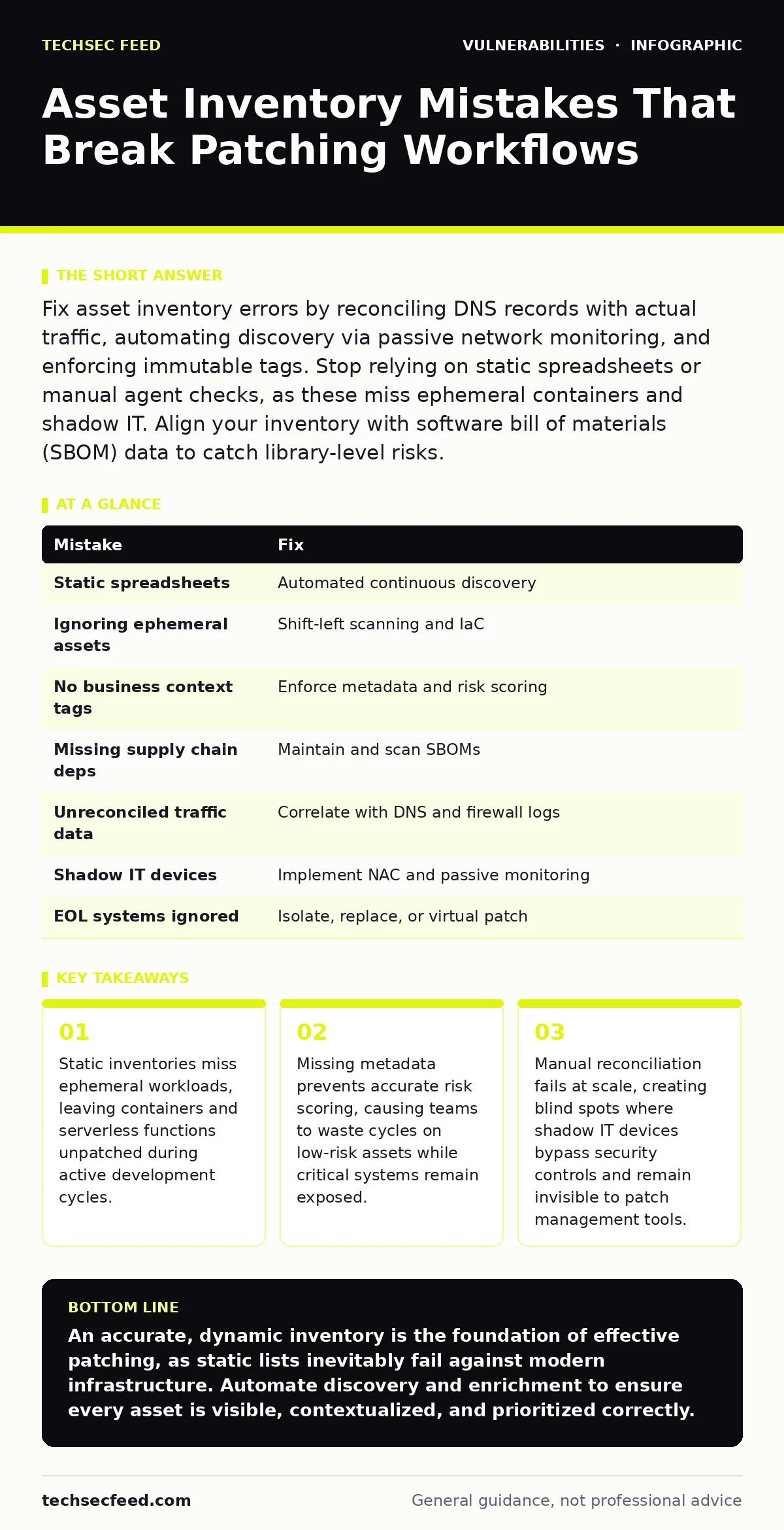
Fix asset inventory errors by reconciling DNS records with actual traffic, automating discovery via passive network monitoring, and enforcing immutable tags. Stop relying on static spreadsheets or manual agent checks, as these miss ephemeral containers and shadow IT. Align your inventory with software bill of materials (SBOM) data to catch library-level risks.
Mistake 1: Relying on static spreadsheets for asset tracking
Static spreadsheets become outdated the moment infrastructure changes. Cloud environments spin up and tear down resources continuously. A spreadsheet captured yesterday does not reflect the servers running today. This gap creates immediate blind spots in your security posture.
Why it hurts:
You patch assets that no longer exist or ignore new vulnerabilities on live systems. The effort spent maintaining the sheet diverts resources from actual remediation. Stale data leads to false confidence, where teams believe they are covered because the list looks complete. This illusion delays response to active threats.
The fix:
Implement automated discovery tools that poll DNS, DHCP, and cloud provider APIs continuously. These tools update the inventory in real time as resources are created or destroyed. Integrate this data into your patch management system to ensure every active asset is visible. This removes the manual overhead and reduces the window of exposure for new deployments.
Mistake 2: Ignoring ephemeral containers and serverless functions
Many organizations focus patching efforts on long-lived virtual machines and physical servers. They overlook containers, pods, and serverless functions that exist for minutes or hours. These ephemeral assets often run with minimal base images that lack security updates. They are frequently deployed in development and testing environments that mirror production.
Why it hurts:
Ephemeral assets often share the same kernel or underlying platform as production systems. A vulnerability in a base image can propagate across hundreds of short-lived containers. If you do not track these assets, you cannot patch the base images or enforce security policies. This allows attackers to exploit transient services to pivot into more stable parts of your infrastructure.
The fix:
Shift security left by scanning container images during the build process. Reject images that contain known vulnerabilities before they are deployed. Use infrastructure-as-code templates that enforce security standards automatically. Monitor runtime environments for unexpected processes or connections. This approach ensures that ephemeral assets are secure by design, reducing the need for post-deployment patching.
Mistake 3: Failing to tag assets with business context
An inventory that lists IP addresses and operating systems lacks critical context. Without tags indicating business criticality, data sensitivity, or owner, you cannot prioritize patching efforts. All assets appear equally important, forcing teams to patch everything simultaneously or guess which systems matter most. This lack of differentiation leads to inefficient resource allocation.
Why it hurts:
You waste time patching low-risk assets while high-value targets remain vulnerable. Critical business applications may suffer downtime because they were patched alongside non-essential systems. Without context, you cannot assess the real impact of a vulnerability. This makes it difficult to justify emergency patching or to communicate risk to stakeholders effectively.
The fix:
Enforce a tagging policy that requires every asset to have metadata. Tags should include business function, data classification, and owner contact. Automate tag verification to ensure compliance. Use this metadata to calculate risk scores that combine vulnerability severity with asset criticality. This allows you to prioritize patching for the assets that matter most to your organization.
Mistake 4: Overlooking third-party and supply chain dependencies
Many organizations focus on patching their own applications and infrastructure. They neglect the libraries, frameworks, and third-party components integrated into their software. These dependencies often contain vulnerabilities that are not visible in standard asset inventories. A single compromised library can expose multiple applications to the same risk.
Why it hurts:
Vulnerabilities in dependencies can remain undetected for long periods. When a critical flaw is discovered, you may need to patch dozens of applications simultaneously. This creates a massive operational burden and increases the risk of breaking functionality. Ignoring supply chain risks leaves your organization exposed to attacks that bypass your own security controls.
The fix:
Maintain a software bill of materials (SBOM) for all your applications. This document lists every component and its version. Use automated tools to scan dependencies for known vulnerabilities. Integrate dependency updates into your continuous integration pipeline. This ensures that you are aware of all components and can update them quickly when risks emerge.
Mistake 5: Not reconciling inventory with network traffic data
Asset inventories often rely on discovery tools that scan for open ports or respond to pings. However, some assets may be isolated, firewalled, or configured to ignore such probes. Conversely, some traffic may come from sources not listed in the inventory. Relying solely on active scanning misses these discrepancies.
Why it hurts:
You may miss assets that are critical to your operations but do not respond to standard discovery methods. Alternatively, you may patch assets that are not actually in use, wasting resources. Unreconciled traffic can indicate shadow IT or compromised devices that are communicating with external servers. These blind spots reduce the effectiveness of your patching strategy.
The fix:
Correlate your asset inventory with network traffic data from firewalls, proxies, and DNS logs. Identify assets that are communicating but not listed in the inventory. Investigate discrepancies to determine if they are legitimate or malicious. This holistic view ensures that your inventory reflects the actual state of your network, not just what is easily discoverable.
See also: Vulnerability Chaining: Why Isolated Flaws Become Critical Risks · Hardcoded Secrets Prevention Checklist for Secure Source Code
Mistake 6: Assuming all devices are managed by IT
Shadow IT occurs when business units procure and manage their own devices and software without IT involvement. These devices often connect to the corporate network but are not included in the asset inventory. They may lack security updates, antivirus software, or other controls. This creates significant security risks that are difficult to detect.
Why it hurts:
Shadow IT devices can serve as entry points for attackers. They may contain sensitive data or provide access to critical systems. Because they are not managed by IT, they are not patched regularly. This increases the likelihood of successful attacks and data breaches. Detecting and remediating these devices is challenging without proper visibility.
The fix:
Implement network access control (NAC) policies that require device authentication before granting network access. Use passive monitoring tools to detect unauthorized devices. Establish clear policies regarding the use of personal or unmanaged devices. Educate employees on the risks of shadow IT and provide approved alternatives for their needs. This reduces the prevalence of unmanaged assets.
Mistake 7: Neglecting to track end-of-life and unsupported systems
Organizations often continue using operating systems and applications that have reached end-of-life (EOL). These systems no longer receive security updates from the vendor. They remain in the inventory but are not prioritized for patching because there are no patches available. This creates a persistent risk that grows over time.
Why it hurts:
Unsupported systems are prime targets for attackers. Exploits for these systems are widely available and well-known. Keeping them online increases the attack surface of your organization. The cost of maintaining these systems often exceeds the cost of replacing them, yet they remain in use due to inertia or budget constraints.
The fix:
Identify all EOL systems in your inventory. Develop a plan to replace or isolate these systems. Use virtual patching or network segmentation to mitigate risks while replacement plans are in progress. Track CISA KEV due dates to prioritize the removal of the most dangerous unsupported systems. This reduces the long-term risk associated with legacy technology.
| Mistake | Fix |
|---|---|
| Static spreadsheets | Automated continuous discovery |
| Ignoring ephemeral assets | Shift-left scanning and IaC |
| No business context tags | Enforce metadata and risk scoring |
| Missing supply chain deps | Maintain and scan SBOMs |
| Unreconciled traffic data | Correlate with DNS and firewall logs |
| Shadow IT devices | Implement NAC and passive monitoring |
| EOL systems ignored | Isolate, replace, or virtual patch |
Key takeaways
- Static inventories miss ephemeral workloads, leaving containers and serverless functions unpatched during active development cycles.
- Missing metadata prevents accurate risk scoring, causing teams to waste cycles on low-risk assets while critical systems remain exposed.
- Manual reconciliation fails at scale, creating blind spots where shadow IT devices bypass security controls and remain invisible to patch management tools.
An accurate, dynamic inventory is the foundation of effective patching, as static lists inevitably fail against modern infrastructure. Automate discovery and enrichment to ensure every asset is visible, contextualized, and prioritized correctly.
Frequently asked questions
How often should I refresh my asset inventory?
Refresh your inventory continuously using automated tools. Cloud environments change rapidly, and even hourly updates may be insufficient for high-churn development environments. Real-time synchronization is the goal.
What is the difference between an asset inventory and a CMDB?
An asset inventory lists what exists, while a CMDB maps relationships and dependencies. Both are needed for patching. The inventory ensures visibility, while the CMDB helps understand the impact of changes and outages.
Can passive monitoring replace active scanning?
Passive monitoring identifies active devices by observing traffic, which avoids missing quiet or firewalled systems. However, it may not detect offline assets or provide detailed version information. Combine both methods for best results.
How do I handle assets that cannot be patched?
For assets that cannot be patched, use network segmentation to isolate them. Implement virtual patching via firewalls or proxies to block exploit attempts. Monitor these assets closely for signs of compromise and plan for replacement.
How this guide was produced: written by the TechSec Feed editorial team with AI assistance, checked against the public references listed below, and reviewed when the facts change. See our editorial policy or report an error.