Remote Access Control System: How It Works and What You Miss
Remote access control systems enforce policy at the connection edge, but they often fail to verify device health until after the tunnel is established.
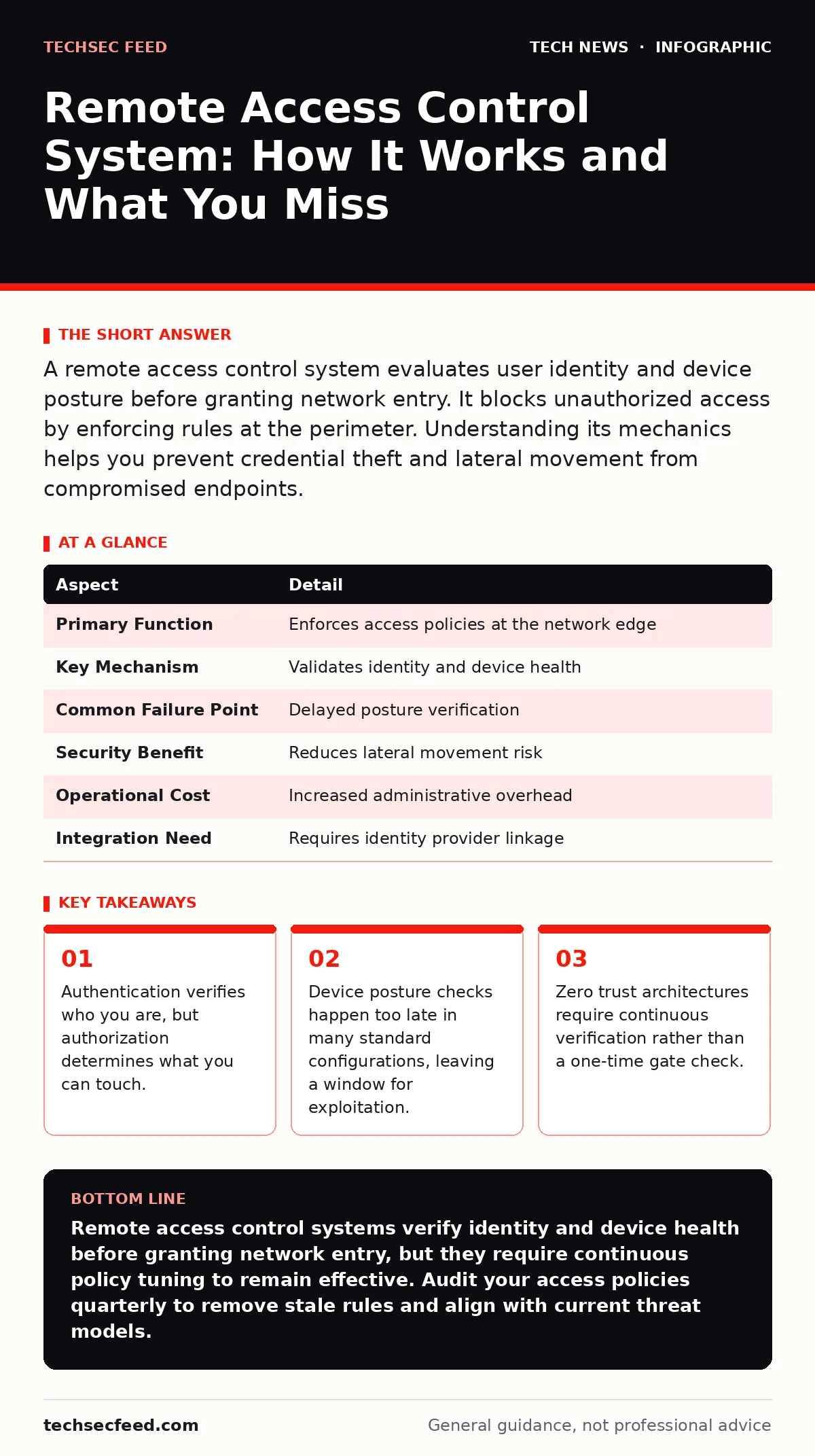
A remote access control system evaluates user identity and device posture before granting network entry. It blocks unauthorized access by enforcing rules at the perimeter. Understanding its mechanics helps you prevent credential theft and lateral movement from compromised endpoints.
How Remote Access Control System Works
Imagine a high-security building where the guard checks your badge before you enter, but also inspects your shoes for tracking devices. A remote access control system performs this dual check for network entry. It does not simply ask for a password. It evaluates the context of the request. The system verifies the user's identity through multi-factor authentication. It then assesses the device requesting access. This assessment includes checking for updated operating systems and active antivirus software. If the device fails these checks, the system denies the connection.
This prevents a compromised laptop from reaching internal resources. The mechanism relies on policies defined by administrators. These policies dictate which users can access which resources from which locations. The system acts as a gatekeeper. It sits between the external network and your internal infrastructure. It intercepts every incoming connection attempt. Without this layer, the network perimeter is effectively open. The system logs every attempt for later audit. These logs provide evidence of who tried to enter and why they were rejected.
| Aspect | Detail |
|---|---|
| Primary Function | Enforces access policies at the network edge |
| Key Mechanism | Validates identity and device health |
| Common Failure Point | Delayed posture verification |
| Security Benefit | Reduces lateral movement risk |
| Operational Cost | Increased administrative overhead |
| Integration Need | Requires identity provider linkage |
Identity and Device Posture
The system separates identity from device health. Identity answers the question of who is connecting. Device posture answers the question of what is connecting. Many organizations focus heavily on identity verification. They implement strong passwords and hardware tokens. They neglect the device state. A stolen laptop with a valid token still poses a risk. The remote access control system must verify the endpoint. It checks for encryption on the hard drive. It verifies the presence of security patches. It ensures that no unauthorized software is running. This process is called posture assessment.
If the assessment fails, the system can quarantine the device. Quarantine places the device in a restricted network zone. This zone allows only remediation traffic. It blocks access to sensitive data. This approach limits the damage of a compromised endpoint. It forces the user to fix the issue before gaining full access. This adds friction to the user experience. Users may find the process annoying. Security teams must balance friction with protection. High friction leads to shadow IT workarounds. Users may bypass the system to get work done. This creates larger security gaps than the original risk.
Common Misconfigurations
People usually get wrong how granular the policies should be. Broad policies create excessive risk. A policy that allows all employees full access is dangerous. It treats a CEO and an intern as equal threats. It ignores the principle of least privilege. Another common error is trusting the network perimeter. Administrators assume that once inside, users are safe. This assumption fails in modern environments. Devices move between networks constantly. A laptop that is secure at home may connect to a public Wi-Fi network later.
The remote access control system must re-evaluate trust. Static configurations do not account for dynamic threats. They assume the device state remains constant. This assumption is rarely true. Malware can install itself after the initial check. The system must monitor the session. It must terminate connections that show suspicious behavior. Continuous monitoring requires more resources. It generates more logs. It demands more analysis capability. Many teams lack the staff to review these logs. Unreviewed logs provide no security value. They create a false sense of safety.
Integration with Identity Providers
The system relies on accurate identity data. It cannot verify users without an identity provider. The identity provider stores user credentials and attributes. It confirms that the user is who they claim to be. The remote access control system queries this provider during login. If the provider is compromised, the control system fails. Attackers can inject false identity data. They can make a malicious user appear legitimate. This is why identity provider security is paramount. You must protect the database that holds user records.
Regular audits of identity data are necessary. Remove accounts that are no longer needed. Disable accounts that have been inactive. This reduces the attack surface. A smaller set of active accounts is easier to manage. It is also easier to monitor for anomalies. Anomalous login patterns often indicate compromise. The system should flag these patterns. It should require additional verification for suspicious logins. This step adds security without blocking legitimate users. It adapts to the risk level of the attempt.
Impact on Operations
The system affects every user who connects remotely. It adds steps to the login process. Users must present multiple forms of identification. They may need to approve login requests on a secondary device. This process takes time. It can disrupt workflows. Employees may feel frustrated by the delays. Support teams receive more tickets. Users report issues with authentication failures. They need help resolving device posture errors. This increases the workload for IT staff. The system also impacts software development teams.
Developers may need to access internal testing environments. The control system must allow this access securely. It must not block legitimate development traffic. This requires careful policy tuning. Developers often need higher privileges than standard users. Granting these privileges increases risk. The system must balance access needs with security constraints. This balance is difficult to achieve. It requires ongoing collaboration between security and development teams.
See also: TLS Handshake Explained: The Mechanics of Secure Connections · How Man-in-the-Middle Attacks Steal Your Data
Zero Trust Alignment
Traditional perimeter security is no longer sufficient. The remote access control system supports zero trust principles. Zero trust assumes no user or device is trusted by default. It requires verification for every request. The system enforces this verification at the edge. It does not rely on network location for trust. A user inside the office is not automatically trusted. A user outside the office is not automatically blocked. The decision is based on identity and posture. This approach reduces the impact of a breach.
If an attacker compromises credentials, they still need a compliant device. They still need to pass continuous checks. This makes lateral movement difficult. The attacker cannot easily move from one system to another. The system isolates each session. It limits the scope of any single compromise. This containment is vital for modern security. It protects sensitive data from widespread exposure. The system must be configured to support this isolation. Network segmentation complements this approach. It ensures that even if access is granted, it is limited.
Related Security Controls
Remote access control does not operate in isolation. It works with other security measures. For instance, network address translation hides internal IP addresses from external view. This adds a layer of obscurity. It does not replace access control, but it complements it. Similarly, IPv6 security requires specific configuration to prevent address enumeration. The remote access system must handle IPv6 connections securely. It must apply the same policies to IPv6 as to IPv4.
Neglecting one protocol creates a bypass route. Attackers will exploit the weaker path. macOS security settings also play a role. If the remote system allows macOS devices, it must verify their security configuration. This includes checking for filevault encryption. It must ensure that the device meets baseline security standards. Consistency across operating systems is key. The policy engine must understand different device types. It must apply appropriate checks for each.
Continuous Improvement
The system requires regular review. Policies become outdated over time. New threats emerge that old policies do not address. Security teams must update rules frequently. They must test these rules for effectiveness. Testing reveals gaps in coverage. It identifies policies that are too strict or too loose. Feedback from users is valuable. It highlights operational issues. It helps refine the balance between security and usability. The system should evolve with the organization. As new applications are deployed, access rules must expand.
As old applications are retired, rules must contract. This lifecycle management prevents policy bloat. Bloat makes the system harder to manage. It increases the risk of misconfiguration. Regular audits ensure that the system remains aligned with business needs. It also ensures compliance with regulatory requirements. Compliance is not a one-time event. It is an ongoing process. The remote access control system is central to this process. It provides the evidence needed for audits. It demonstrates that access is controlled and monitored.
Key takeaways
- Authentication verifies who you are, but authorization determines what you can touch.
- Device posture checks happen too late in many standard configurations, leaving a window for exploitation.
- Zero trust architectures require continuous verification rather than a one-time gate check.
Remote access control systems verify identity and device health before granting network entry, but they require continuous policy tuning to remain effective. Audit your access policies quarterly to remove stale rules and align with current threat models.
Frequently asked questions
What is the difference between remote access control and a firewall?
A firewall filters traffic based on IP addresses and ports. Remote access control filters based on user identity and device security posture. The firewall asks where the traffic is going. The access control system asks who is sending it and if their device is safe.
Can a remote access control system prevent all malware infections?
No. It blocks devices that fail specific health checks. It cannot detect every type of malware or every zero-day exploit. It reduces the risk by ensuring devices meet baseline security standards. It does not provide complete immunity against sophisticated attacks.
How does this system handle mobile devices?
It uses mobile device management agents to verify security settings. It checks for device encryption and passcode strength. It may require a containerized workspace for corporate data. This ensures that personal data remains separate from work data.
What happens if the identity provider goes down?
The system may deny all new connections if it cannot verify identities. Some configurations allow cached credentials for existing sessions. This prevents total outage during brief provider failures. However, new users cannot log in until the provider recovers.
How this guide was produced: written by the TechSec Feed editorial team with AI assistance, checked against the public references listed below, and reviewed when the facts change. See our editorial policy or report an error.