File Metadata Explained: How Hidden Data Compromises Privacy
Your files carry invisible history records that survive deletion and reveal operational details you never intended to share with the recipient.
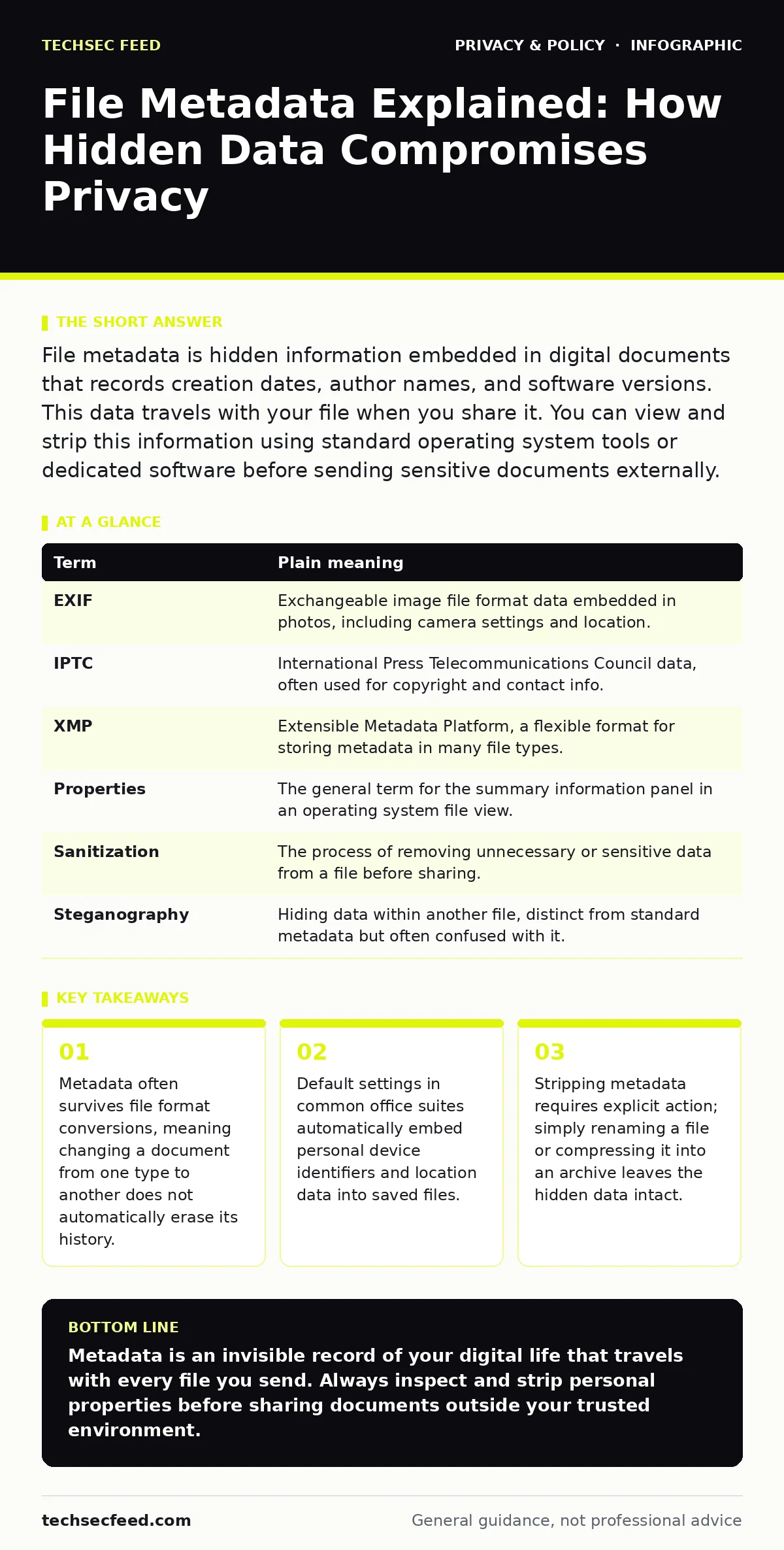
File metadata is hidden information embedded in digital documents that records creation dates, author names, and software versions. This data travels with your file when you share it. You can view and strip this information using standard operating system tools or dedicated software before sending sensitive documents externally.
The Library Book Analogy
Imagine you borrow a hardcover book from a library. The story inside is the content you care about. But the book also carries a library sticker, a checkout card, and faint pencil marks in the margin. These are the metadata. When you return the book, the librarian sees who checked it out, when, and how many times it was renewed. You might think you are just returning the story, but you are also returning the record of your interaction with it.
Digital files work the same way. When you create a document, your computer stamps it with invisible labels. These labels record who made the file, when it was last opened, and what software created it. Most users focus only on the visible text or image. They forget that the container holds a detailed log of its own life.
What Metadata Actually Contains
Metadata is data about data. It provides context for the file itself rather than the information it displays. A photograph contains more than pixels. It includes the camera model, the lens settings, and often the GPS coordinates of where the photo was taken. A word processing document stores the author’s username, the total editing time, and the names of anyone who reviewed it.
This information helps operating systems sort files and helps collaboration tools track changes. However, it also creates a fingerprint. That fingerprint can link a file back to a specific device or user account. Even if you delete your name from the document text, the internal properties may still list it as the creator.
Common Points of Confusion
Many users believe that saving a file as a new format removes its history. This is a persistent myth. Converting a Word document to PDF often carries over the original author field and creation date. The new format may change how the data is structured, but it rarely deletes the underlying properties unless you explicitly tell the software to strip them.
Another confusion involves file renaming. Changing "Draft_Final.docx" to "Report.docx" only alters the filename. The internal metadata remains untouched. The file still knows it was created three weeks ago by a specific user. It does not care what you call it on the desktop.
Compression also fails to sanitize data. Placing a file in a ZIP archive bundles it for transport. It does not scrub the embedded properties. The archive is just a box; the book inside still has the library sticker.
The Hidden Cost of Convenience
Office suites and creative tools default to collecting data because it aids collaboration. If you work in a team, knowing who edited a section is useful. The trade-off is privacy. The same feature that helps your colleagues coordinate also broadcasts your work habits to anyone you send the file to.
This is particularly relevant when dealing with privacy laws for small businesses. If your firm handles client data, sending files with embedded internal IDs or server paths can violate compliance standards. You are not just sharing a document; you are sharing a map of your internal infrastructure.
Consider anonymization techniques. True anonymization requires removing all identifiers. Merely blurring a face in a photo does not remove the GPS tags in the metadata. A recipient can still pinpoint the exact location where the photo was taken.
A Mini Glossary of Terms
| Term | Plain meaning |
|---|---|
| EXIF | Exchangeable image file format data embedded in photos, including camera settings and location. |
| IPTC | International Press Telecommunications Council data, often used for copyright and contact info. |
| XMP | Extensible Metadata Platform, a flexible format for storing metadata in many file types. |
| Properties | The general term for the summary information panel in an operating system file view. |
| Sanitization | The process of removing unnecessary or sensitive data from a file before sharing. |
| Steganography | Hiding data within another file, distinct from standard metadata but often confused with it. |
See also: Zero Knowledge Encryption Cloud Storage: How It Works and What You Lose · Privacy Audits Checklist: Verify Data Flows and Consent
Three Steps to Clean Your Files
- Inspect before sending. Right-click the file and select Properties. Look for the Details or Summary tab. Read the Author, Manager, and Company fields. If they contain personal or internal information, you need to act.
- Use built-in removal tools. Most modern operating systems and office suites include a "Remove Personal Information" or "Sanitize" button. Use this before exporting. Do not assume the default save action cleans the file.
- Verify the output. After stripping metadata, open the file again and check the properties. Ensure the fields are blank or generic. If you converted the format, check the new file too. Metadata migration is common.
When Metadata Becomes a Liability
Imagine you submit a job application. The resume PDF lists your name as the author. It also lists your current employer as the company in the properties. A future employer could see this before you even interview. It is a small detail, but it changes the dynamic of the application.
In security operations, metadata is used for forensics. Analysts use creation times and modification logs to determine when a breach occurred. For you, this same data can reveal your operational rhythm. If you send a file that shows it was edited at 3 AM, you reveal your working hours.
This is why privacy audits are necessary. You must treat metadata as part of your data handling policy. It is not just a technical artifact; it is a privacy risk. Ignoring it is like locking your front door but leaving the windows open.
Beyond the File Itself
Files do not exist in a vacuum. They interact with other systems. Tracker pixels in emails can confirm when you open a message, which is a form of behavioral metadata. While not embedded in the file itself, it is related data that tracks your actions.
Similarly, people-search sites aggregate public data. If you upload a photo with metadata to a public forum, that data can be scraped and indexed. The metadata becomes part of a larger profile about you.
Understanding consent management helps here. If you collect photos from others, you must ensure they consent to the sharing of their location data embedded in those images. You are responsible for the data you distribute, not just the content you create.
Key takeaways
- Metadata often survives file format conversions, meaning changing a document from one type to another does not automatically erase its history.
- Default settings in common office suites automatically embed personal device identifiers and location data into saved files.
- Stripping metadata requires explicit action; simply renaming a file or compressing it into an archive leaves the hidden data intact.
Metadata is an invisible record of your digital life that travels with every file you send. Always inspect and strip personal properties before sharing documents outside your trusted environment.
Frequently asked questions
Does converting a file to PDF remove metadata?
No, converting formats often preserves original metadata like author names and creation dates unless you explicitly use a sanitization tool during the export process.
Can I remove metadata from a photo after sending it?
No, once the file is sent, the recipient has a copy with the original metadata. You must strip it before sending.
Do free online metadata removers work safely?
They can work, but uploading sensitive documents to third-party servers poses a privacy risk. Use offline tools whenever possible.
Is metadata considered personal data?
Yes, if it identifies you or your device, it is personal data and subject to privacy regulations and best practices.
How this guide was produced: written by the TechSec Feed editorial team with AI assistance, checked against the public references listed below, and reviewed when the facts change. See our editorial policy or report an error.