Exposed Admin Panels: Detection, Hardening and Risk
Default credentials and known paths make exposed admin panels the fastest route for attackers to gain full system control without exploiting complex vulnerabilities.
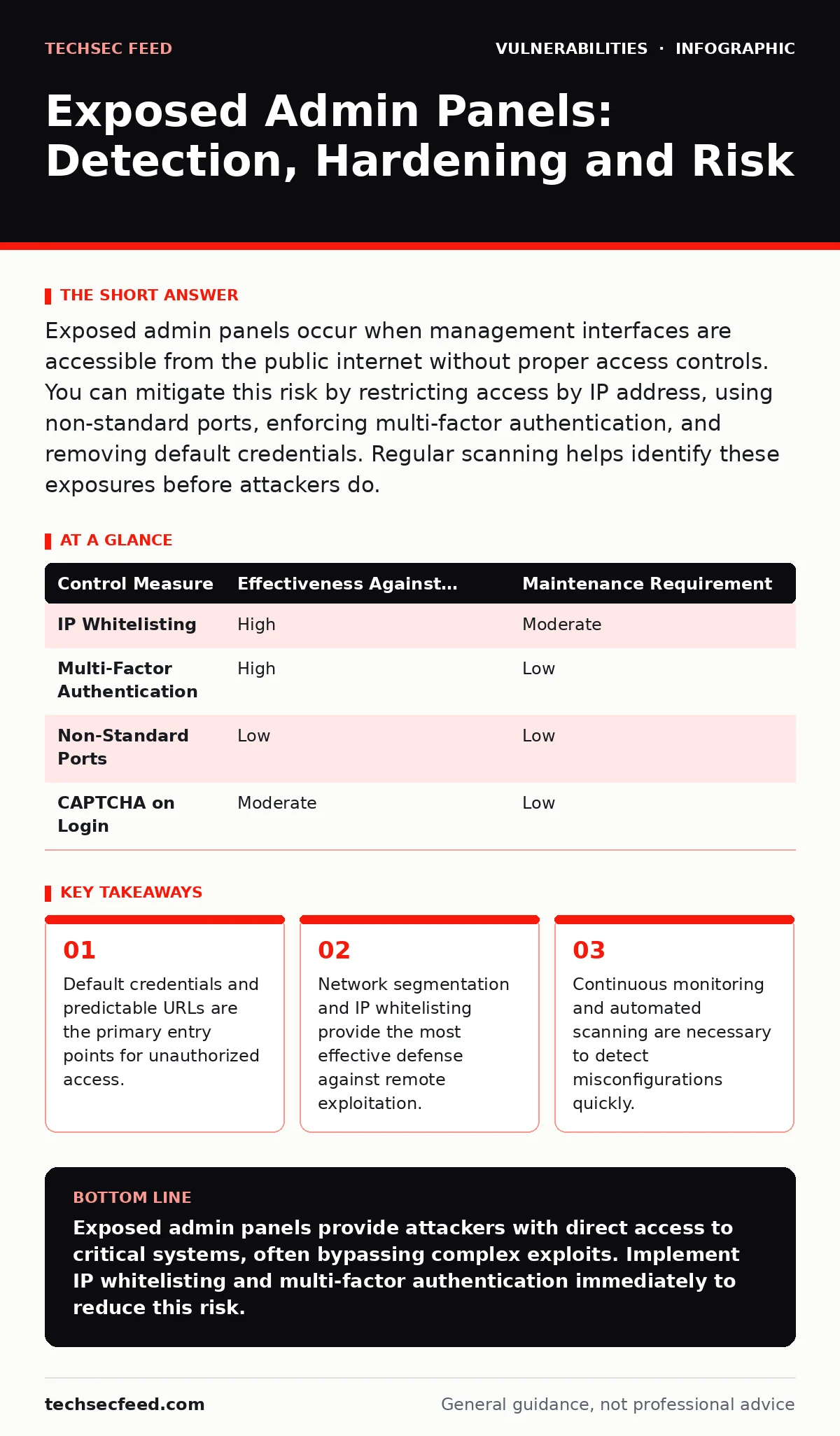
Exposed admin panels occur when management interfaces are accessible from the public internet without proper access controls. You can mitigate this risk by restricting access by IP address, using non-standard ports, enforcing multi-factor authentication, and removing default credentials. Regular scanning helps identify these exposures before attackers do.
What defines an exposed admin panel?
An exposed admin panel is a web-based management interface that remains accessible to the public internet without adequate authentication or network restrictions. These interfaces allow administrators to configure services, manage users, and view system logs. When left open, they provide a direct path for attackers to control the underlying infrastructure. The exposure often results from misconfigured firewalls or default installation settings.
Why are default credentials so dangerous?
Default credentials are factory-set usernames and passwords that attackers know from public documentation or device manuals. Attackers use automated tools to scan for these known combinations across the internet. If you do not change them, an attacker gains immediate access without needing to exploit a software vulnerability. This bypasses all other security controls that rely on proper authentication.
How do attackers find these interfaces?
Attackers use search engines and specialized scanning tools to locate admin panels by their common URLs and directory names. Common paths include /admin, /administrator, and /manager. These tools also identify specific software versions by analyzing headers and login page content. Knowing the software version allows attackers to select known exploits for that specific release.
What is the role of IP whitelisting?
IP whitelisting restricts access to an admin panel only from specific, trusted IP addresses or ranges. This method ensures that only known administrators can attempt to log in. It effectively blocks the vast majority of automated scans and brute-force attempts from the public internet. However, it requires careful maintenance as administrator locations or IP addresses change.
Why is multi-factor authentication necessary?
Multi-factor authentication requires users to provide two or more verification factors to gain access. Even if an attacker obtains a valid password, they cannot enter without the second factor, such as a hardware token or mobile app code. This adds a critical layer of defense against credential theft and reuse. It significantly reduces the risk of unauthorized access from compromised passwords.
| Control Measure | Effectiveness Against Automation | Maintenance Requirement |
|---|---|---|
| IP Whitelisting | High | Moderate |
| Multi-Factor Authentication | High | Low |
| Non-Standard Ports | Low | Low |
| CAPTCHA on Login | Moderate | Low |
See also: Remote Access Control System: How It Works and What You Miss
Does changing the login URL help?
Changing the default login URL to a custom path adds a layer of obscurity that stops casual scanners. Automated tools often target well-known default paths, so a unique path reduces detection frequency. However, this is not a security control and fails against targeted attacks or detailed reconnaissance. It should be used alongside strong authentication, not as a replacement.
How do you detect exposed panels automatically?
Regular external vulnerability scanning identifies open ports and accessible web directories. These scans compare findings against known default paths and software signatures. Integrating these scans into your vulnerability management programs ensures continuous monitoring of your external attack surface. Automated alerts allow you to remediate exposures before they are exploited.
What about internal admin panels?
Internal admin panels face different risks, primarily from lateral movement within the network. Attackers who compromise a single workstation may pivot to reach internal management interfaces. Configuration hardening ensures that these panels are not accessible from untrusted network segments. Segmentation limits the blast radius of any internal compromise.
How do you secure legacy systems?
Legacy systems often lack support for modern authentication methods or network controls. You can isolate these systems on a separate network segment with strict access controls. Using a jump server or bastion host provides a controlled entry point for maintenance. This approach allows you to maintain older software while limiting its exposure to broader threats.
What is the impact of dependency updates?
Admin panels often rely on third-party libraries and frameworks that may contain vulnerabilities. Failing to apply dependency updates leaves these known flaws exploitable. Regular patching ensures that security fixes from upstream developers are applied to your environment. This reduces the risk of remote code execution through the admin interface.
How do you handle cloud-based panels?
Cloud environments introduce dynamic IP addresses and complex network rules. Misconfigured security groups or firewall rules can accidentally expose admin panels to the internet. Using identity-based access controls instead of IP-based rules can improve flexibility. Regular audits of cloud configurations prevent accidental exposure due to drift.
What steps should you take first?
Begin by conducting an external scan to identify any exposed admin panels. Change all default credentials and enforce multi-factor authentication immediately. Implement IP whitelisting for all management interfaces to restrict access. Review your secure software development lifecycle to ensure new deployments do not repeat these mistakes.
How do you verify your controls?
Regular penetration testing and red team exercises validate the effectiveness of your controls. These tests simulate real-world attacks to identify gaps in your defense strategy. Monitoring logs for failed login attempts helps detect ongoing attacks. Integrating these insights into your vulnerability prioritization process ensures rapid remediation of critical findings.
Key takeaways
- Default credentials and predictable URLs are the primary entry points for unauthorized access.
- Network segmentation and IP whitelisting provide the most effective defense against remote exploitation.
- Continuous monitoring and automated scanning are necessary to detect misconfigurations quickly.
- Removing or disabling unused administrative interfaces reduces the overall attack surface significantly.
Exposed admin panels provide attackers with direct access to critical systems, often bypassing complex exploits. Implement IP whitelisting and multi-factor authentication immediately to reduce this risk.
Frequently asked questions
Can I use CAPTCHA to stop brute force attacks?
CAPTCHA can slow down automated attacks by requiring human interaction. However, it does not protect against credential theft or sophisticated targeted attacks. It should be used as an additional layer, not a primary control.
Is hiding the admin panel behind a CDN enough?
A CDN can provide some obscurity and rate limiting, but it does not replace authentication. Attackers can still reach the origin server if the CDN is misconfigured. Proper access controls must be enforced at the application level.
How often should I scan for exposed panels?
Continuous scanning is ideal, as misconfigurations can occur at any time. At minimum, perform external scans after any infrastructure changes. Integrate scanning into your regular **vulnerability management programs** for consistent coverage.
What if I need remote access for support?
Use a dedicated, secure remote access solution with strict logging and multi-factor authentication. Avoid exposing admin panels directly to the internet for support purposes. Implement time-limited access tokens for temporary support needs.
How this guide was produced: written by the TechSec Feed editorial team with AI assistance, checked against the public references listed below, and reviewed when the facts change. See our editorial policy or report an error.